

Sky-Watcher
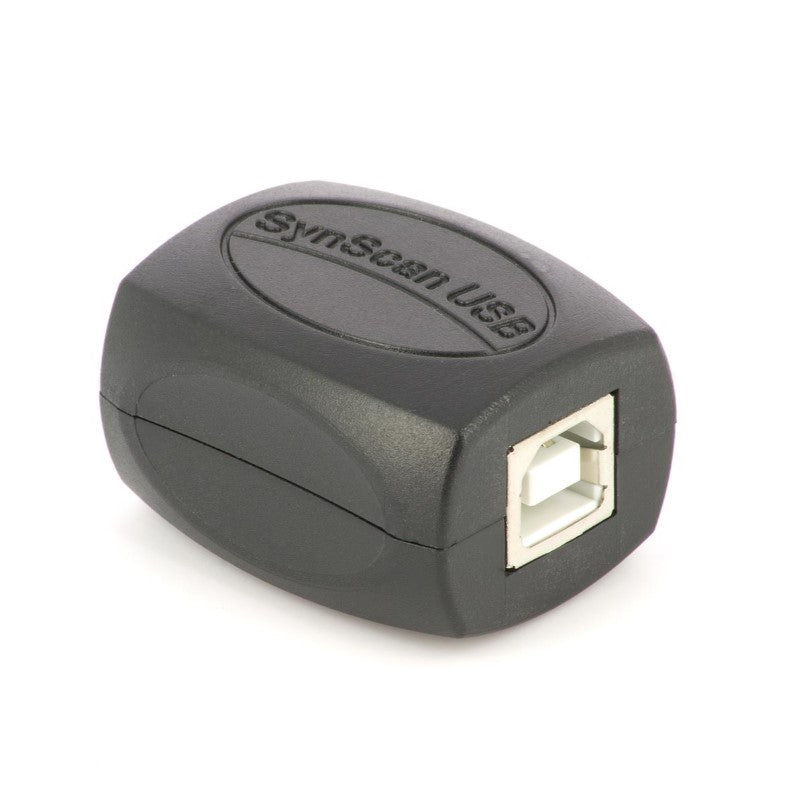
Synscan Sky-Watcher USB Adapter for PC
Synscan Sky-Watcher USB Adapter for PC
Couldn't load pickup availability
- SECURE PAYMENT
- AVAILABLE ON REQUEST
- ESTIMATED DELIVERY: 3 WEEKS
Allows you to connect your SynScan to your PC
- Then he points his instrument at any part of the sky.
- Requires download of SynScan Pro application for PC/Windows
This box allows you to connect your Sky-Watcher mount to your PC . After downloading the ASCOM PC/Windows SynScan Pro driver, you can easily control your mount equipped with the SynScan controller without interrupting your WiFi connection. Simply connect the Sky-Watcher dongle on one end to the braided cable from your control panel (the latter will no longer be used) or the cable supplied as standard, and on the other end to a USB type B cable (the same as for printers - not supplied). Your mount then connects to your PC via USB.
Using the SynScan Pro app , point your instrument at the sky or using third-party software such as Prism or Sky Map...
Please note: Sky-Watcher USB dongle is 100% compatible with EQMOD .


⚠️ NOTAS DE ADVERTENCIA
GAFAS PARA LA OBSERVACIÓN DE ECLIPSE
- INSTRUCCIONES: Revise antes de cada uso. No utilice ni deseche si está dañado, rasgado, perforado o separado de alguna manera del marco. No lo use con otros dispositivos ópticos. No es un juguete. Los niños deben usarlo solo bajo la supervisión de un adulto. Limítese a 3 minutos de uso continuo, con interrupciones durante varias horas. No se mueva mientras usa este producto, no conduzca un vehículo ni opere maquinaria. No lo use si tiene un ojo enfermo o después de una operación ocular.
- ADVERTENCIA: Nunca mire directamente al sol sin protección ocular especial. Siempre use gafas de eclipse al observar el eclipse solar, especialmente si una parte del sol es visible. Mirar directamente al sol puede causar daños permanentes si no se toman las precauciones adecuadas. Se debe usar protección ocular adecuada, diseñada específicamente para la observación solar, para evitar que los rayos dañinos del sol lleguen a los ojos. Deséchelo después de 3 años y no lo utilice después de ese tiempo.
OBSERVACIÓN SOLAR CON TELESCOPIO
- Nunca mire al sol a través de un ocular/telescopio sin un filtro de protección verificado. Un filtro lunar nunca puede usarse para la observación solar. El filtro lunar solo es adecuado para la observación de la luna. El filtro solar debe montarse en la apertura del telescopio, no en el ocular. De lo contrario, el rayo de luz concentrado por la óptica destruirá inmediatamente la película del filtro, lo que provocará daños oculares graves e incluso ceguera total.
- Revise el filtro solar antes de cada observación solar y asegúrese de que no esté dañado. Manténgalo frente a una fuente de luz intensa para poder detectar posibles grietas y/o agujeros. No use el telescopio para la observación solar, incluso si el filtro solar está solo ligeramente dañado. En este caso, comuníquese con el fabricante para obtener las piezas de repuesto correspondientes.
- Siempre use el filtro solar cuando observe el sol. Asegúrese de que este filtro esté colocado correctamente en el telescopio según las instrucciones. El uso del filtro solar está destinado únicamente para su uso con este telescopio.
- Revise el ajuste del filtro solar antes de cada observación solar. Si se suelta accidentalmente de la abertura del objetivo, esto puede causar daños oculares inmediatos y permanentes, e incluso ceguera.
- Si el filtro solar no puede montarse de manera suficientemente firme en el tubo, mejore el ajuste colocando varias tiras de fieltro autoadhesivas o similares entre el filtro solar y la abertura del objetivo. Nunca use el filtro solar si no puede colocarse correctamente en el telescopio. En tal caso, siempre contacte primero con nuestro servicio al cliente.
- Tenga mucho cuidado al observar el sol. Incluso una mirada corta a través de la óptica sin protección puede causar daños oculares graves e incluso ceguera total.
- Los niños, incluso con el filtro montado correctamente, no deben mirar al sol a través del telescopio. Nunca deje a los niños sin supervisión.
- Nunca deje la óptica sin supervisión. Los niños y los adultos inexpertos podrían dirigir el telescopio hacia el sol sin las precauciones adecuadas y perder la vista.
- No realice observaciones solares sin la consulta previa de un médico después de una operación ocular o cualquier otra enfermedad ocular.
- Las ondas/pliegues en la película son normales y no constituyen un defecto del producto.
- No exponga el dispositivo a altas temperaturas.
ADVERTENCIAS Y SEGURIDAD DE LAS PILAS
- NO USE pilas falsas en los productos. Use solo las pilas proporcionadas. Use la pila EXCLUSIVAMENTE para el propósito previsto.
- Guarde las pilas fuera del alcance de los niños y mascotas.
- NO USE pilas que parezcan tener la carcasa dañada, inflada o modificada. No use pilas que hayan goteado, huelan, estén hinchadas o derretidas o presenten abolladuras, óxido, grietas o rayones.
- La pila NO debe ser desmontada, aplastada, perforada, triturada ni manipulada de ninguna otra forma.
- La pila NO debe exponerse a líquidos.
- No debe intentar secar una pila mojada o húmeda con un dispositivo o fuente de calor.
- El dispositivo o la pila NO deben ser colocados cerca de una fuente de calor o bajo la luz solar directa.
- La pila NO debe tocar objetos metálicos.
- La pila NO debe ser almacenada junto a materiales peligrosos o inflamables. Guarde la pila en un lugar fresco, seco y bien ventilado.
- La pila NO debe insertarse incorrectamente al cargarla.
- La pila NO debe cargarse bajo luz solar directa ni a temperaturas extremas. Cárguela a temperatura ambiente (20 °C – 26 °C).
- Evite dejar caer la pila o el producto. Si sospecha que la pila está dañada, reemplácela.
- Nunca deje su dispositivo conectado a la corriente más de 24 horas. Deje que la pila se agote y luego recárguela.
- Para obtener los mejores resultados, reemplace las pilas según el uso después de 12 meses o antes.
- Siga las regulaciones locales para la eliminación de las pilas usadas. NO arroje la pila al fuego ni al agua.
Telescope accessories
-

Astronomy cameras
Astronomy cameras , specially designed to capture images from space, offer several...
-

Alignment Accessories
Collimation is the exact orientation of the optics within a telescope. It...


